The code from that mail, filled in one click.
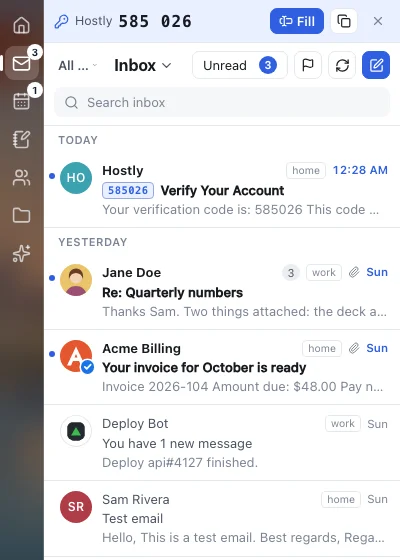
A site sends you a code by email. Sideora spots it as the mail lands, shows it at the top, and fills it into the page that asked for it.
Seen as it lands
The code from a new mail is shown at once, with the name of who sent it.
Filled where it belongs
Fill types it into the page that asked; Copy puts it on your clipboard.
Only that site
Filling asks Chrome for the one site the code came from, when you click; nothing else.
How it works
Three steps.
Ask for the code
On any site, as usual.
Watch it arrive
It appears at the top of Sideora, in the side panel or the new tab.
Fill
One click, and on to the next step.
Questions
Good to know.
Which codes?
The usual sign-in and verification codes sent by mail, in the accounts you added.
How long is a code shown?
While it is useful: most codes are dead after ten minutes, and Sideora lets them go soon after.
Try Sideora early.
Free during early access. One mail when it is your turn, and nothing else.