An AI assistant for your mail, with your own key.
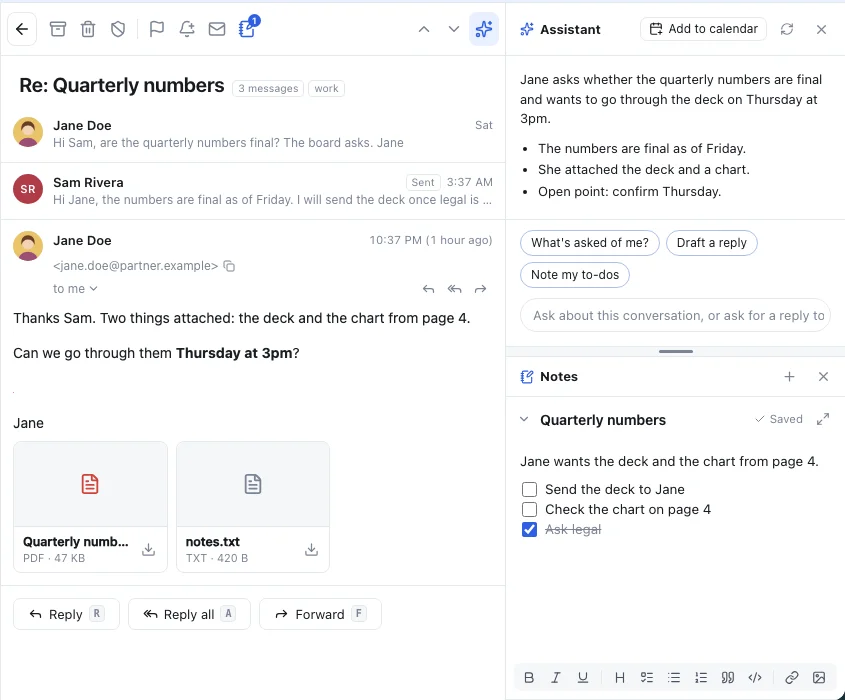
Sideora's assistant reads the conversation you have open and helps: what it says, what is asked of you, what to do, and a reply in your words. It uses the provider you choose, from your computer.
It helps where you read
A summary, the questions asked of you, to-dos in a note, an event added to your calendar, a reply drafted, beside the mail.
Your provider, your key
Anthropic, OpenAI, Google Gemini, Mistral, OpenRouter and other OpenAI-compatible services. Your key stays on your computer.
You stay in charge
It writes drafts; you read them and send them. Nothing goes out on its own.
How it works
Three steps.
Add an AI connection
Pick a provider and paste your key, in Settings. Several connections are fine.
Open a conversation
Ask the assistant, or tap a suggestion: summarise, what is asked of me, draft a reply.
Review and send
The draft waits in your drafts, in your mail account, for you.
Questions
Good to know.
Do you see what I ask?
No. Your computer asks your provider directly, with your key. Its terms apply to what it receives.
Is the assistant required?
No. Sideora works fully without it, and nothing is sent to any AI until you ask.
Try Sideora early.
Free during early access. One mail when it is your turn, and nothing else.