Your mail beside every tab.
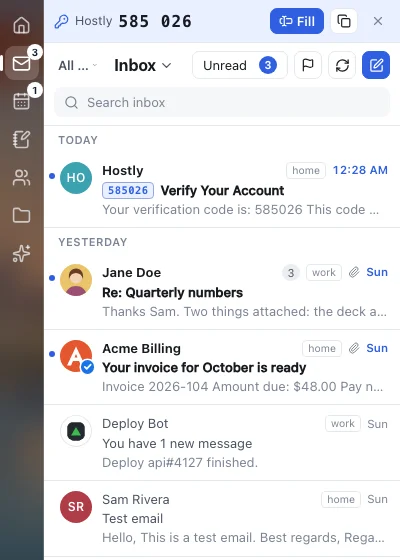
Keep the inbox open next to whatever you are doing: Sideora lives in Chrome's side panel, and a new tab can open on its Home.
Always at hand
Mail, calendar, notes, people and the assistant, in a panel that stays open while you browse.
A calm new tab
Home on every new tab: the time, the weather, what is unread and what is coming up.
Codes where they are asked
A sign-in code from a new mail is filled into the page that asked for it, in one click.
How it works
Three steps.
Install Sideora
On your computer: the extension talks to it there.
Add the extension
Then link it to Sideora once, from the computer.
Open the panel
Click Sideora's icon: your mail, beside the page.
Questions
Good to know.
Does the extension read my browsing?
No. It asks for no access to the pages you visit; filling a code asks for that one site, when you click.
Which browsers?
Chrome, and Chromium-based browsers such as Brave and Edge.
Try Sideora early.
Free during early access. One mail when it is your turn, and nothing else.